

Bioremediation is the use of microbes to break down or neutralize “hazardous substances” or “contaminants” thereby removing dangerous chemicals from the environment. The science of bioremediation is listed as one of the Environmental Protection Agency’s (EPA) innovative technologies.
How It Works
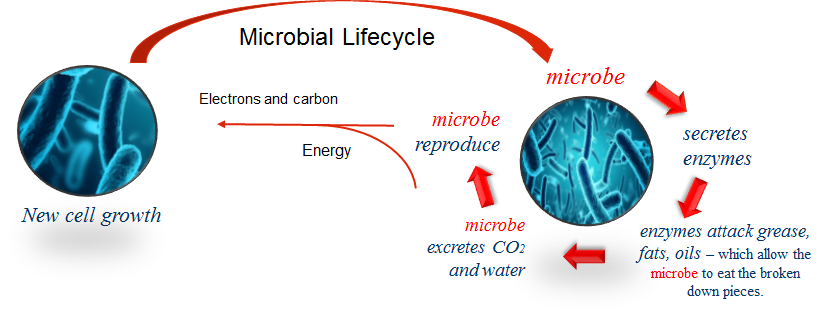
Today, Bioremediation is used in commercial applications because:
It is viable both at the contaminated site or at a containment site
Involves little to no energy input
Can reduce contaminants to healthy levels
Is effective in contaminant, waterways, sediment, or ground water
Waste Reduction – Do the math Calculator
SmartWasher bioremediation system allows users to:
- Dramatically reduce waste streams
- Eliminate expense of hazardous liquid waste removal contracts
- Realize overall savings from waste and contract fees
Just Do the Math

ONE SOLVENT PARTS WASHER holding 16 gallons of solvent that is changed every 6 weeks generates 832 lb (377 kg) of waste annually.
Formula: gal of solvent x density of solvent x times solvent is replaced per year = pounds of waste annually
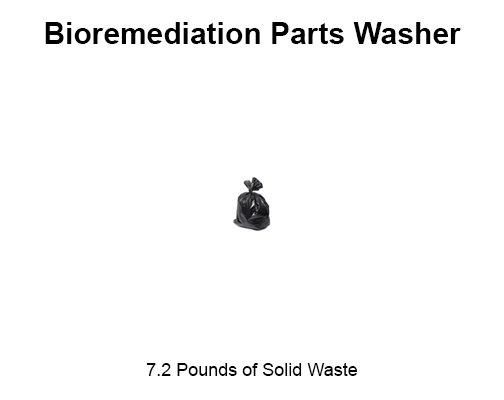
ONE SMARTWASHER® BIOREMEDIATING PARTS WASHER, changing one OzzyMat® filter per month generates 7.2 lb (3.3 kg) annually
Formula: weight of OzzyMat® x number of mats used per year = pounds of waste annually
As Easy as 1-2-3
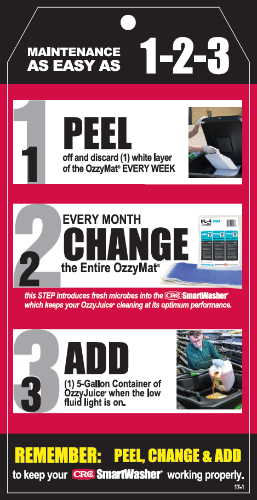
- Peel A Layer
- Peeling off a layer every week restores optimal filtration
- Be prepared for Exceptions: Layers may be changes more frequently with high usage
- Peeling off a layer every week restores optimal filtration
- Change A Filter
- After 4 weeks the filter is spent
- Microbes are added to the solution each time a new filter is installed to keep the colonies healthy
- Remember to check and empty the stainless steel basket(s) if applicable
- Add Cleaning Solution
- When the RED “add fluid” on the control panel is on
- Add entire 5 gallon (20 L) container of solution
- Fluid sustains the microbial ecosystem
Avoid Adding Hazardous Materials
To reduce the chances of adding hazardous materials to your SmartWasher solution here are some things that may help:
- Things to Avoid:
- Ignitable hazardous waste
- Using solvents or other cleaners over the parts washer
- Using parts washer for non-business related parts cleaning
- Change your filter as recommended to prevent contaminants from getting into the OzzyJuice® cleaner
- Clean out the sludge routinely
While these precautions will help keeping the system clean the end user must always follow local guidelines for waste testing and disposal
Keep Working at Maximum Output
The system relies on a balance of conditions that are easily achieved by the end user:
Temperature:
- Optimal operating temperatures: 105-115°F (40-46°C)
- At optimal temperature, microbes break down contaminants at an optimal rate
- The aqueous cleaning fluid will freeze ~28°F (-2.2°C) but the microbe will not die
- At low temperature microbes slow down remediation and reproduction rate
- Temperatures greater than 140°F(60°C) will kill the microbes
- If left idle for 2-3 weeks, the SmartWasher will require reactivation of microbes by adding OzzyBooster® and a new OzzyMat®
Environment:
- Biocides designed to kill microbes will kill the Ozzy® microbes do not use the following near your SmartWasher®: Disinfectants, Strong pesticides, Antibacterial solutions
- Dumping waste oil into the SmartWasher® can smother and kill the microbe: Loading excess oil/greases will encapsulate the microbe and impede its ability to capture Oxygen
- Adding new microbes to the system is beneficial to the health of the microbe ecosystem and productivity of the SmartWasher®
- System salinity can become a factor at concentrations higher than 5% by weight
The SmartWasher® Bioremediating parts washing system is robust and simple in design with very few serviceable parts.
On those occasions when customers need help to quickly diagnose and correct issues this document will help return the SmartWasher® to service.
Troubleshooting Unit With No Power
Troubleshooting Unit that is Tripping Circuit Breakers
Troubleshooting Unit that is Not Pumping
Troubleshooting Unit that is Over Heating/ Not Heating
For further questions and personalized technical support contact your technical service representative:
Americas
| USA/CDA | +1 800.521.3168 |
| MX/LAR | +81 2139.0572 |
EMEIA
| Poland | +48 693.750.864 |
| India | +91 93.1118.5533 |
| +91 98.0195.0700 |
APAC
| AUS | +61 2.9849.6700 |
| NZ | +64 9.272.2700 |
| China | +86 (0)21 6236 6035 |
- Peel A Layer
- Peeling off a layer every week restores optimal filtration
- Be prepared for Exceptions: Layers may be changes more frequently with high usage
- Peeling off a layer every week restores optimal filtration
- Change A Filter
- After 4 weeks the filter is spent
- Microbes are added to the solution each time a new filter is installed to keep the colonies healthy
- Remember to check and empty the stainless steel basket(s) if applicable
- Add Cleaning Solution
- When the RED “add fluid” on the control panel is on
- Add entire 5 gallon (20 L) container of solution
- Fluid sustains the microbial ecosystem
To reduce the chances of adding hazardous materials to your SmartWasher solution here are some things that may help:
- Things to Avoid:
- Ignitable hazardous waste
- Using solvents or other cleaners over the parts washer
- Using parts washer for non-business related parts cleaning
- Change your filter as recommended to prevent contaminants from getting into the OzzyJuice® cleaner
- Clean out the sludge routinely
While these precautions will help keeping the system clean the end user must always follow local guidelines for waste testing and disposal
- Optimal operating temperatures: 105-115°F (40-46°C)
- At optimal temperature, microbes break down contaminants at an optimal rate
- The aqueous cleaning fluid will freeze ~28°F (-2.2°C) but the microbe will not die
- At low temperature microbes slow down remediation and reproduction rate
- Temperatures greater than 140°F(60°C) will kill the microbes
- If left idle for 2-3 weeks, the SmartWasher will require reactivation of microbes by adding OzzyBooster® and a new OzzyMat®
- Biocides designed to kill microbes will kill the Ozzy® microbes do not use the following near your SmartWasher®: Disinfectants, Strong pesticides, Antibacterial solutions
- Dumping waste oil into the SmartWasher® can smother and kill the microbe: Loading excess oil/greases will encapsulate the microbe and impede its ability to capture Oxygen
- Adding new microbes to the system is beneficial to the health of the microbe ecosystem and productivity of the SmartWasher®
- System salinity can become a factor at concentrations higher than 5% by weight
| Situation | Test | Diagram |
| Green power light is off —> check the GFCl/RCD | Push Reset button(s) in and verify that lights comes on or the pump starts |  |
| If green light remains off —> test the outlet to make sure it is delivering power |
Local maintenance and repair regulations will dictate who will perform this testing from this point on: Confirm outlet delivers power if not plug unit into a working outlet |
 |
| If after resetting the CGFI/RCD trips once again… | Move on to Troubleshooting: Tripping Breakers Section | |
| If CGFI and Power are both functional but there is still no power to the machine | The circuit board, power cord, or power supply may need replacement. Contact “CRC Technical Service” for Instructions on contact a qualified technician |
| Situation | Testing |
| Check if the repeated tripping is occurring at the breaker | Possible line overload; plug Unit into another outlet that is not on the same breaker |
| If still experiencing repeated tripping at the GFCI/RCD Outlet | Most common cause for tripping the GFCI/RCD outlet is either a pump or heater issue |
| Follow these simple instructions to determine if you need a new pump |
Local maintenance and repair regulations will dictate who will perform this testing from this point on: Test: disconnect pump wires and check that GFCI/RCD remains reset if not Pump requires replacement. Watch Pump Replacement Video: www.smartwasher.com |
| If test shows pump is working then determine if the heater needs replacement |
Test: disconnect heater wires and check that GFCI/RCD remains reset if not Fleater requires replacement. Watch Heater Replacement Video: www.smartwasher.com |
| Situation | Test | Diagram |
| If green Power Light is flashing | Call your local CRC Technical Service |  |
| If green light is off… | Make sure the machine is plugged into a If green light is off… working power outlet and GFCI/RCD is not tripped | |
| If power is on then check to see if the point on: pump fuse is melted |
Local maintenance and repair regulations will dictate who will perform this testing from this Test: check pump fuse in control box, labeled FI, and replace if needed |
 |
| If fuse is functional or continues to fail |
Perform pump replacement Watch Pump Replacement Video www.smartwasher.com |
| Situation | Test | Diagram |
| Is Unit Overheating? Temperature >115°F/46°C |
Contact your local “CRC Technical Service” | |
| If the green power light is blinking and unit is not pumping |
Local maintenance and repair regulations will dictate who will perform this testing & part replacement from this point on: Perform probe replacement. Watch Probe Replacement Video www.smartwasher.com |
 |
| If the red Add Fluid Light On | Add (1) 5-Gallon (20 lt) container of OzzyJuice® to the unit, confirm red light goes out, allow up to 3 h for liquid to reach operating temperature | |
| If after 3h the liquid is still cold | Test: check heater fuse in control box, labeled F2, and replace if melted |  |
| If the heater fuse is good |
Perform probe replacement Watch Probe Replacement Video www.smartwasher.com |
|
| If heater fuse continues to fail |
Perform heater replacement Watch Heater Replacement Video www.smartwasher.com |